
If you have ever wondered why some websites appear right at the top of Google while others stay buried on page three, the answer almost always comes down to one thing — On-page SEO on WordPress. Getting your content discovered on search engines is no longer a matter of luck or guesswork. It is a structured, intentional process, and WordPress — being the world’s most widely used content management system — gives you everything you need to do it right.
At Marketing Specs, a results-driven digital marketing agency based in Delhi, we have been helping businesses of all sizes improve their search visibility for over a decade. Through real client work and continuous testing, we have developed a deep understanding of what it takes to rank — and it starts right on the page itself. This guide is designed to walk you through every critical element of on-page SEO on WordPress, from the very basics to the more nuanced tactics that most content writers overlook.
Whether you are a business owner managing your own website, a blogger trying to grow your audience, or a content writer looking to sharpen your skills, this guide will give you the practical knowledge you need to start seeing real results.
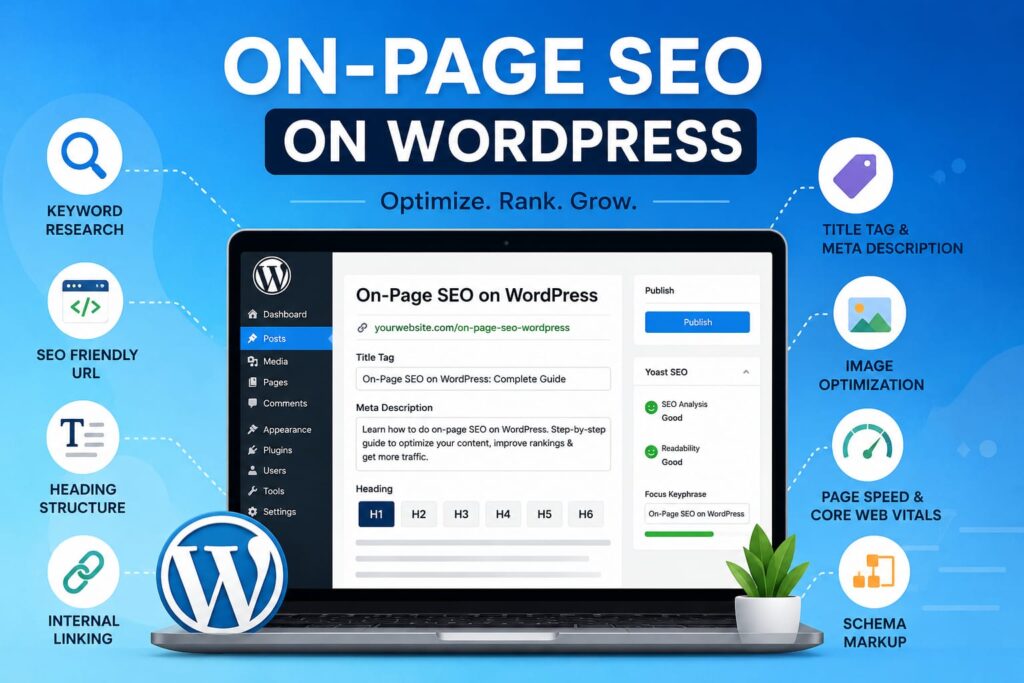
What Is On-Page SEO and Why Does It Matter on WordPress?
On-page SEO refers to all the optimisation actions you take directly on your web pages to improve their position in search engine results. Unlike off-page SEO, which involves backlinks and external signals, on-page SEO is entirely within your control. It covers your content quality, keyword usage, heading structure, meta tags, internal linking, image optimisation, and page speed — among other factors.
WordPress is particularly well-suited for on-page SEO because of its flexibility, its wide range of SEO plugins, and the level of control it gives you over your page structure. When you understand how to optimise content for SEO in WordPress, you essentially put yourself ahead of the competition — because most website owners never go beyond installing a plugin and hoping for the best.
Here is what Google looks at when evaluating an on-page SEO signal:
- Relevance of the content to the search query
- Proper use of keywords within headings, body text, and metadata
- Technical factors such as page loading speed and mobile responsiveness
- User engagement signals like time on page and bounce rate
- Structured data and schema markup for rich results
Understanding Google’s E-E-A-T Guidelines and How They Apply to WordPress Content
Before diving into the technical aspects of on-page SEO on WordPress, it is essential to understand the framework Google uses to evaluate content quality. Google’s Search Quality Rater Guidelines are built around a concept known as E-E-A-T — Experience, Expertise, Authoritativeness, and Trustworthiness. These four pillars determine whether your content is considered high-quality by Google’s ranking systems.
Experience
Google wants to see that the person writing the content has first-hand experience with the subject matter. This means writing from a place of genuine knowledge — sharing real examples, case studies, or personal observations rather than recycling generic information that could be found anywhere.
Expertise
Your content should demonstrate a deep understanding of the topic. For SEO content in particular, this means going beyond surface-level tips and offering detailed, accurate, and actionable guidance — exactly what we aim to do at Marketing Specs with every piece of content we produce.
Authoritativeness
Authority comes from being recognised as a credible source — both by your audience and by other websites. On WordPress, you can build authority by consistently publishing high-quality content, earning backlinks from reputable sources, and maintaining a strong author profile on your site.
Trustworthiness
Trust is built through transparency — accurate information, proper sourcing, an honest author bio, a secure website (HTTPS), and clear contact details. On WordPress, this also means keeping your site free of errors, broken links, and misleading claims.
Keeping E-E-A-T at the forefront of your content strategy is not just about pleasing Google — it is about genuinely serving your readers better. When your content is trustworthy, expert, and experience-backed, it naturally performs well in search.
Step 1 — Keyword Research: The Foundation of On-Page SEO on WordPress
Everything in on-page SEO starts with choosing the right keywords. Without a clear understanding of what your target audience is searching for, even the best-written content can end up invisible on search engines. Keyword research helps you identify the exact phrases people are typing into Google — and then craft content that answers those queries better than anyone else.
When selecting keywords for your WordPress content, keep the following in mind:
- Search Volume: Choose keywords that people are actually searching for. Tools like Google Keyword Planner, Ahrefs, or SEMrush can help you find this data.
- Search Intent: Understand whether users want information, comparison, or are ready to buy. Match your content type to the intent.
- Keyword Difficulty: For newer websites, it is smarter to target long-tail keywords with lower competition before going after high-volume head terms.
- Keyword Density: Keep your primary keyword density under 1.5%. Overusing keywords is called keyword stuffing — and Google penalises it heavily. Natural, reader-friendly usage is always the goal.
Step 2 — Optimising the Title Tag and Meta Description in WordPress
The title tag and meta description are the first things a user sees on the search results page — making them among the most critical on-page SEO elements you will ever work with. In WordPress, managing these is straightforward with an SEO plugin like Yoast SEO or Rank Math.
Writing an Effective Title Tag
Your title tag should:
- Include your primary keyword as close to the beginning as possible
- Be between 50 and 60 characters in length to avoid truncation on SERPs
- Be compelling enough to earn a click — not just for the algorithm, but for real people
- Be unique — no two pages on your website should share the same title tag
Crafting a Click-Worthy Meta Description
Although meta descriptions are not a direct ranking factor, they significantly influence click-through rates — which do impact your SEO over time. Keep your meta description between 150 and 160 characters, include the primary keyword naturally, and frame it as a clear value proposition. Think of it as a mini advertisement for your page.
Step 3 — URL Structure and Heading Tags: Getting the Architecture Right
Optimising Your WordPress URL (Permalink)
A clean, keyword-rich URL is an important signal for both search engines and users. In WordPress, you can set your permalink structure under Settings → Permalinks. Always choose the ‘Post Name’ option, which creates clean URLs like yourwebsite.com/on-page-seo-wordpress. Avoid URLs that are too long, that contain unnecessary numbers or dates, or that do not clearly indicate what the page is about.
Using Heading Tags (H1 to H6) Correctly
Heading tags define the structure of your content and tell search engines what your page is about. Many content writers get this wrong by either ignoring heading tags altogether or using them randomly. Here is how you should approach them on WordPress:
- H1 Tag: Each page should have exactly one H1. In WordPress, the post title automatically becomes your H1. It must contain your primary keyword.
- H2 Tags: Use H2 headings for major sections of your content. Where natural, include your primary or secondary keywords.
- H3 to H6 Tags: These are for sub-sections within H2 sections. Use them to create a logical, readable hierarchy.
- Never skip heading levels — jumping from H2 to H4, for example, disrupts the content structure and confuses search engine crawlers.
Step 4 — How to Optimise Content for SEO in WordPress: Writing That Ranks
This is arguably the most critical part of the entire process. Knowing how to optimise content for SEO in WordPress is not just about keyword placement — it is about creating content that genuinely helps your readers while also satisfying search engine requirements.
Write for Humans First, Algorithms Second
This is advice we give every client at Marketing Specs: the moment you start writing purely for search engines, your content loses its soul. Google’s algorithms have become remarkably good at detecting helpful, authentic content — and equally good at identifying hollow, keyword-stuffed articles. Write naturally, write thoroughly, and write with your reader’s needs at the centre of every paragraph.
Content Depth and Length
Longer, more comprehensive content consistently outperforms thin content in search rankings — but only when the length is earned. Do not pad your content with filler just to hit a word count target. Instead, aim to cover the topic as completely as possible. Answer the questions your readers are likely to have, address common concerns, and provide context that goes beyond what competing pages offer.
Keyword Placement Best Practices
When placing your primary and secondary keywords within the content, follow these guidelines:
- Include the primary keyword within the first 100 words of the introduction
- Use it naturally throughout the body — not every other sentence
- Include the secondary keyword in at least one H2 heading and within the body text
- Use semantic keywords and LSI (Latent Semantic Indexing) terms to add context — synonyms, related phrases, and associated concepts
- Maintain keyword density under 1.5% to avoid any risk of over-optimisation penalties
Use the Yoast SEO or Rank Math Plugin
Both Yoast SEO and Rank Math are outstanding tools that make it significantly easier to optimise content for SEO in WordPress. They analyse your content in real time and provide actionable suggestions — from readability scores to keyword density checks, internal link recommendations, and more. At Marketing Specs, our SEO team uses these tools daily as part of a structured content review process.
Step 5 — Image Optimisation: A Frequently Overlooked On-Page SEO Factor
Images play a dual role in on-page SEO on WordPress. Done correctly, they enhance user experience and contribute to your ranking. Done poorly, they slow down your page and hurt your SEO. Here is how to get image optimisation right:
- File Name: Before uploading, rename your image file to something descriptive and keyword-relevant. For example, ‘on-page-seo-wordpress-checklist.jpg’ is far better than ‘IMG_0023.jpg’.
- Alt Text: Every image on your WordPress page should have a descriptive alt text. This serves two purposes — it helps visually impaired users understand what the image shows, and it gives search engines additional context about your content.
- File Size: Compress images before uploading using tools like TinyPNG or Smush. Large image files are one of the leading causes of slow page loading speeds, which directly impacts your rankings.
- File Format: Use modern formats like WebP wherever possible. They offer superior compression without quality loss.
Step 6 — Internal Linking: Building a Strong Content Ecosystem
Internal linking is one of the most powerful and most underutilised elements of on-page SEO on WordPress. When you link one page of your website to another, you help search engines understand the relationship between your content and distribute link authority across your site. You also guide visitors deeper into your website, reducing bounce rates and increasing session duration — both positive signals for Google.
Follow these internal linking principles on your WordPress site:
- Use descriptive anchor text that gives a clear indication of what the linked page covers — never use generic phrases like ‘click here’
- Link to relevant, related content within your own website whenever appropriate
- Prioritise linking to your most important pages — your pillar content, service pages, or cornerstone articles
- Do not overload a single post with too many internal links — keep it natural and purposeful
Step 7 — Page Speed and Core Web Vitals: Technical On-Page SEO on WordPress
Google officially confirmed that page experience signals — including Core Web Vitals — are a ranking factor. This means that on-page SEO on WordPress is not just about the words on your page; it is also about how fast that page loads and how smooth the user experience is.
The three Core Web Vitals you need to focus on are:
- Largest Contentful Paint (LCP): Measures loading performance. Aim for LCP to occur within 2.5 seconds.
- Interaction to Next Paint (INP): Measures responsiveness to user inputs. Target an INP below 200 milliseconds.
- Cumulative Layout Shift (CLS): Measures visual stability. Keep CLS below 0.1 to avoid unexpected layout shifts.
On WordPress, you can improve your Core Web Vitals by using a fast, lightweight theme, installing a caching plugin (such as WP Rocket or W3 Total Cache), using a Content Delivery Network (CDN), and eliminating render-blocking JavaScript and CSS wherever possible.
Step 8 — Schema Markup: Helping Google Understand Your Content Better
Schema markup is structured data added to your WordPress pages that helps search engines understand the meaning of your content — not just the words. When implemented correctly, schema can result in rich results appearing in Google’s SERPs, such as star ratings, FAQs, breadcrumbs, or event details.
In WordPress, you can implement schema markup without writing a single line of code by using plugins like Rank Math or Schema Pro, which automatically add the appropriate structured data to your posts and pages. From an on-page SEO perspective, schema is particularly valuable for local businesses, e-commerce stores, recipe blogs, and news websites.
Step 9 — Mobile Optimisation: An Essential Pillar of On-Page SEO on WordPress
With more than 60% of all global web traffic now coming from mobile devices, Google has shifted to mobile-first indexing — meaning it predominantly uses the mobile version of your site for indexing and ranking. If your WordPress website is not properly optimised for mobile users, you are already at a significant disadvantage.
To ensure your WordPress site is mobile-friendly:
- Use a responsive WordPress theme that adapts seamlessly to different screen sizes
- Test your pages regularly using Google’s Mobile-Friendly Test tool
- Avoid using large pop-ups or interstitials that block the main content on mobile
- Make sure buttons and tap targets are large enough for comfortable use on small screens
Step 10 — Updating and Refreshing Existing Content: The SEO Advantage Most Sites Miss
One of the most effective and least discussed aspects of how to optimise content for SEO in WordPress is the practice of updating your existing posts and pages. Many website owners put all of their effort into publishing new content while completely neglecting the older articles that already rank — and that is a missed opportunity.
Google favours fresh, accurate content. When you update an older post with new information, improved examples, refreshed statistics, or additional sections that answer user questions more thoroughly, you send a strong signal that your content is actively maintained and trustworthy. In many cases, refreshing an existing post delivers a faster ranking boost than publishing a brand new one.
When refreshing content on WordPress, consider:
- Adding new sections that cover questions your original post did not address
- Updating statistics, data points, and references to ensure accuracy
- Improving the heading structure if it was inconsistent or unclear
- Adding new internal links to newer posts you have published since the original article went live
The On-Page SEO WordPress Checklist: Everything Before You Hit Publish
Before publishing any piece of content on WordPress, run through this checklist to make sure you have covered all your on-page SEO bases:
- The primary keyword appears in the H1 title, the first paragraph, and at least one H2 heading
- The meta title is between 50 and 60 characters and includes the primary keyword
- The meta description is between 150 and 160 characters and compels a click
- The URL is clean, concise, and contains the primary keyword
- All images have descriptive alt text and compressed file sizes
- Internal links to at least two or three related posts are included
- Keyword density is under 1.5% — confirmed using your SEO plugin or a word count tool
- The page loads in under three seconds on both desktop and mobile
- Content is original, well-structured, and genuinely answers the reader’s query
- Schema markup has been added where applicable
https://developers.google.com/search/docs/fundamentals/seo-starter-guide�
Conclusion: Mastering On-Page SEO on WordPress Is a Long-Term Investment
Mastering on-page SEO on WordPress is not something that happens overnight — but the results it delivers are lasting and compounding. Every well-optimised page you publish is a long-term asset that continues to attract traffic, generate leads, and build your brand’s credibility long after it goes live.
The key is consistency and intentionality. Focus on creating content that genuinely serves your audience, follow Google’s E-E-A-T guidelines, optimise every technical element from title tags to page speed, and keep your existing content fresh. When you approach on-page SEO on WordPress as a holistic practice — not a one-time checklist — you position your website for sustainable, long-term growth.
At Marketing Specs, we have seen first-hand how a disciplined, expert approach to on-page SEO transforms websites from invisible to dominant — across industries, across competition levels, and across budgets. If you are ready to take your WordPress SEO seriously, start with the steps outlined in this guide and build from there. The results will speak for themselves.